The PM Kisan Yojana is one of India’s biggest government schemes created to support farmers financially. The scheme’s goal is to help farmers manage essential agricultural expenses and support their families by providing timely financial assistance.
The aim of Pradhan Mantri Kisan Samman Nidhi (PM-Kisan) is to provide small and marginal farmers some extra financial help for farming expenses like seeds, fertilizers, and other daily needs. It’s a simple, helpful scheme that reaches millions of farmers across the country.
To make it easier for people to understand this scheme, pmkisan.online shares clear, step-by-step guides, updates, and important information related to PM Kisan Summan Nidhi. From application details to beneficiary list checks and installment updates everything is explained here in a simple way for farmers and their families.
For official services and updates, always visit the PM Kisan Yojana official website.
What is PM Kisan?
Pradhan Mantri Kisan Samman Nidhi (PM-Kisan) is a government scheme started by the Government of India to support farmers across the country. Under this scheme, the government provides financial assistance of ₹6,000 per year to eligible farmers in three equal installments of ₹2,000 each.
The main aim of PM-Kisan is to give farmers some extra financial help to manage their farming expenses and support their families. This money is directly transferred to the farmer’s bank account through Direct Benefit Transfer (DBT).
Why is PM Kisan Important for Farmers?
Farming involves regular expenses like buying seeds, fertilizers, water, and other resources. Sometimes, small and marginal farmers struggle to manage these costs. PM-Kisan helps by offering a fixed amount every four months, which can be useful for farmers to meet these small but important needs.
Who Can Apply for PM Kisan?
This scheme is meant for small and marginal farmers across India. Farmers with cultivable land in their names can apply. However, certain people like government employees, income tax payers, and institutional landowners are not eligible.
Where to Apply and Check PM Kisan Status?
Farmers can apply for this scheme and check their application status through the official PM-Kisan portal:
From this website, farmers can:
- Register for the scheme
- Check their name in the beneficiary list
- See installment payment status
- Complete e-KYC
- Download scheme certificates
Benefits of PM Kisan Portal
The PM Kisan portal is the official online platform created by the Government of India to manage and monitor the Pradhan Mantri Kisan Samman Nidhi (PM-Kisan) Yojana. This website offers several useful services and benefits to farmers across the country. Let’s go through them one by one.
Direct Access to Financial Benefits
The biggest advantage is that farmers can receive ₹6,000 every year under the PM Kisan scheme. The amount is sent directly to their registered bank accounts in three equal installments of ₹2,000.
Online New Farmer Registration
Farmers can apply for the scheme themselves from home by registering online on the PM Kisan portal. This saves time and avoids the need to visit government offices.
e-KYC Update Facility
Farmers can easily complete their Aadhaar-based e-KYC online through the portal using their Aadhaar number and OTP. This helps avoid problems in receiving installments.
Check Registration and Payment Status
The portal allows farmers to check their application status, approval status, and payment details anytime. You can track whether your form is pending, approved, or rejected, and also check if your money has been credited.
Access Beneficiary List
The website provides a feature to check the list of approved farmers in your village. This way, anyone can confirm if their name is included in the beneficiary list.
Update Farmer Details
If any information like name, mobile number, or land records is incorrect or incomplete, farmers can request updates and corrections through the portal while the application is pending.
Download Installment and Beneficiary Reports
Farmers can view and download details of their payment history, how many installments they have received, and whether future payments are pending.
No Need for Middlemen
The PM Kisan portal is designed to work directly between farmers and the government. This reduces the chances of delays, fraud, or middlemen interference in financial benefits.
How to Apply for New Farmer Registration on PM Kisan Portal
If you’re a farmer and haven’t registered yet under the PM Kisan Yojana, you can easily do it online. Here’s a simple step-by-step process you can follow.
Visit the PM-Kisan Portal:
Open any browser and go to the official PM-Kisan website by clicking here:
👉 PM-Kisan Samman Nidhi
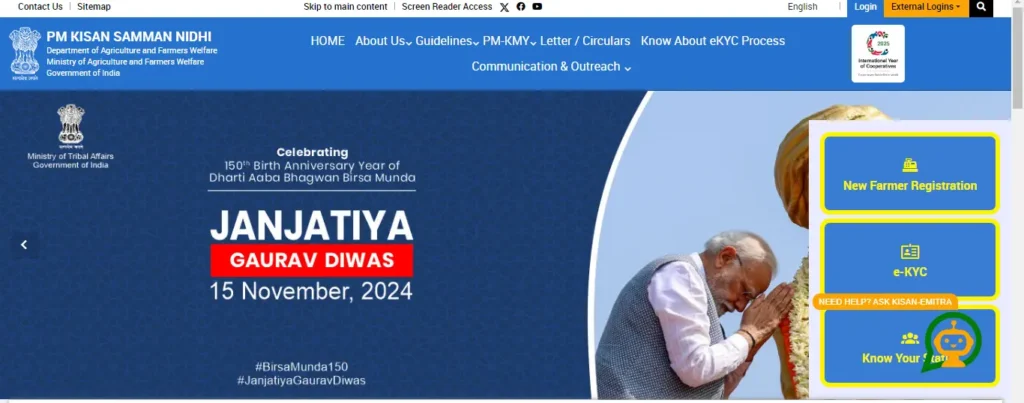
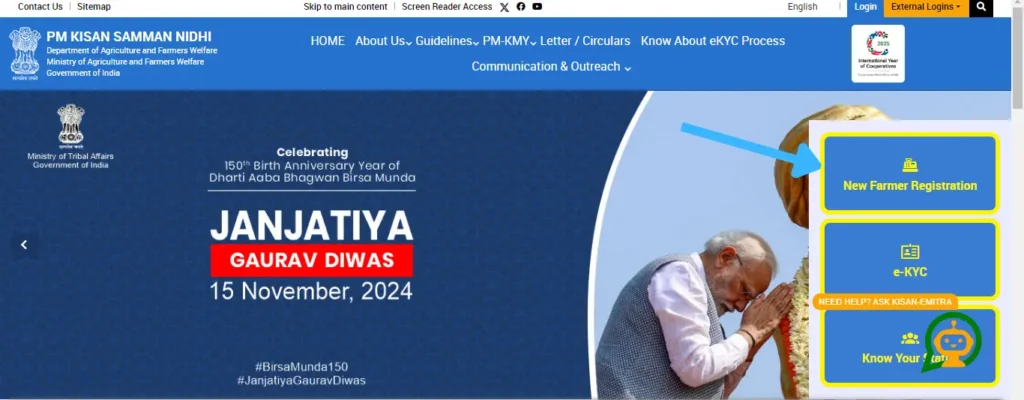
Click on ‘New Farmer Registration’:
On the homepage, look for the Farmers Corner section on the right side. Under this, click on the option called ‘New Farmer Registration’.
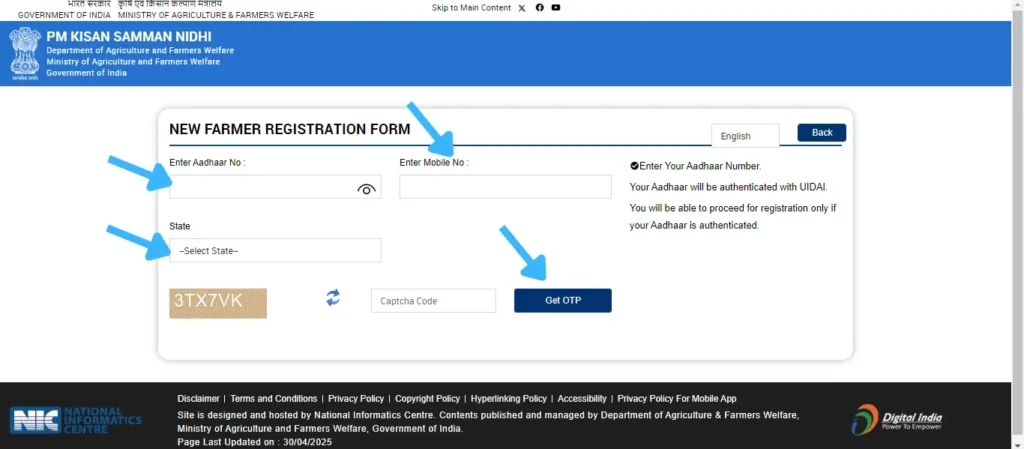
Enter Aadhaar Number:
A new page will open asking for your Aadhaar Number and Mobile number. Enter it carefully and select your state from the dropdown list. Then, click Search.
Fill Required Details:
After that, a registration form will appear. You need to fill in the following details:
- Name (as per Aadhaar)
- Gender
- Category (General / OBC / SC / ST)
- Date of birth
- Father’s or Husband’s name
- Mobile number
Enter Land Details:
Now, add your landholding information:
- State, District, Block / Taluk, Village
- Survey number / Khasra number
- Land area in hectares
- Land ownership details as per records
Upload Documents (If Required):
In some states or districts, you might be asked to upload scanned copies of:
- Aadhaar card
- Land ownership proof
- Bank passbook photo
- Caste certificate (if applicable)
Upload the documents in the prescribed size and format.
Submit the Application:
After filling all the details, double-check everything and click on the Submit button.
Note Down the Registration Number:
Once your registration is complete, a confirmation message with your Registration Number will appear. Save it or take a screenshot — you’ll need this for future reference.
How to Check New Farmer Registration Form Status on PM Kisan Portal
Once you’ve submitted your new farmer registration form under the PM-Kisan Yojana, you can easily check whether your details are recorded properly and see your payment or approval status.
Visit the PM-Kisan Official Website:
Open any browser and go to the official website:
Go to 👉 PM-Kisan Official Website
Go to ‘Farmers Corner’:
On the homepage, find the Farmers Corner section on the right side.
Click on ‘Status of Self Registered/CSC Farmer’:
Here’s the important part —
You won’t see ‘Status of Self Registered/CSC Farmer’ or ‘Beneficiary Status’
Click on it.
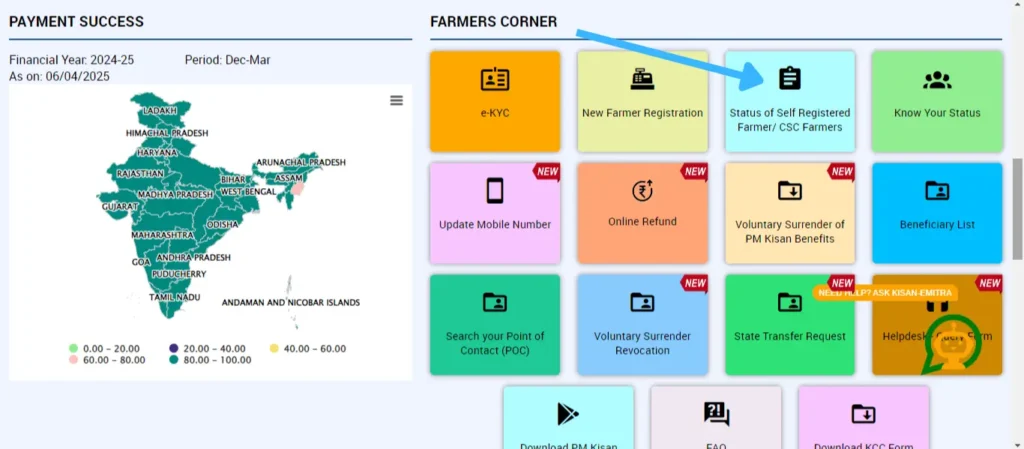
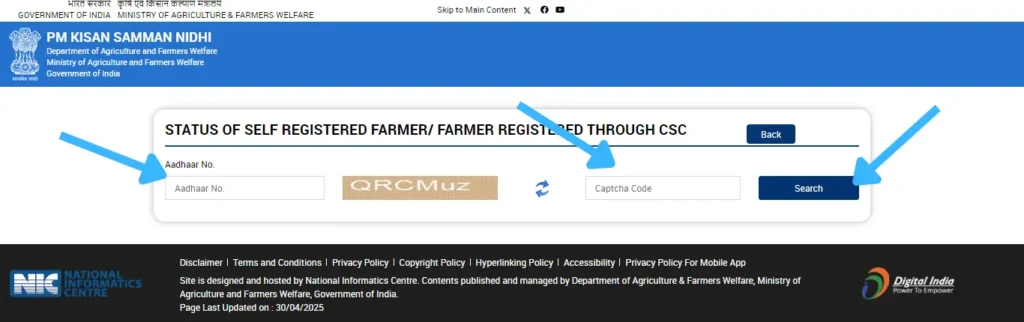
Enter Aadhaar Number and Captcha:
Now a new page will appear asking for:
- Aadhaar Number
- Fill the image captcha code
Then, click on Search.
See Your Registration Form Status:
Once you hit search, it will show your application status:
- Pending for approval
- Approved by District / State
- Rejected with reason
- Or if no data is found, it means the form hasn’t been processed yet.
How to Check PM Kisan Beneficiary Status Online
If you’ve registered under the PM-Kisan Yojana and want to know whether your name is included in the beneficiary list and if your installment payment is approved, you can easily check it online. The PM-Kisan portal offers a simple option to track your beneficiary status in just a few steps. Here’s how you can do it.
Visit the PM-Kisan Official Website:
Open any browser and go to the official website:
👉 PM-Kisan Official Website
Click on ‘Know Your Status’:
Now, click on the option ‘Know Your Status’ available inside the Farmers Corner section.
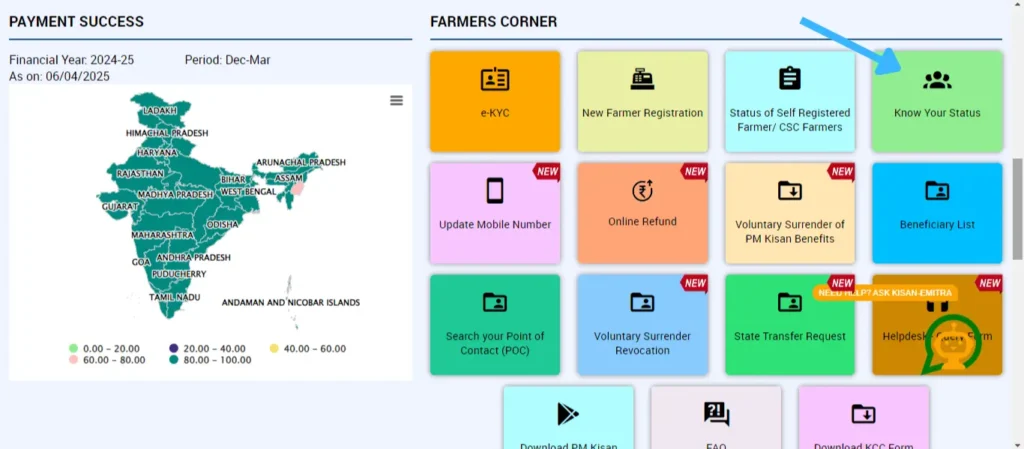
This option is meant for farmers who already have their Registration Number after form submission.
Enter Registration Number and Captcha:
A new page will open where you need to:
- Enter your Registration Number
- Fill the image captcha code shown on the screen
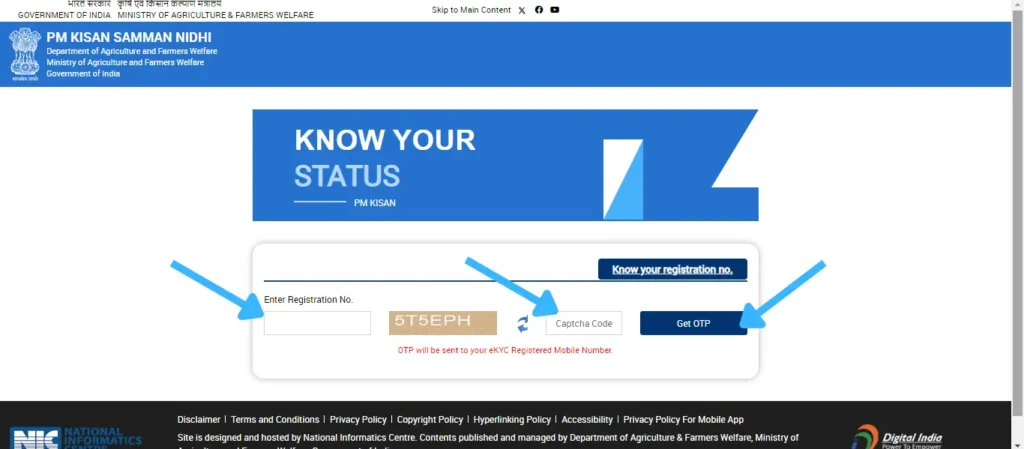
Then, click on Get OTP.
See Your Registration Form Status:
After Getting OTP verification, your application details will appear on the screen.
It will show:
- Pending for approval
- Approved by District / State
- Rejected with reason
If no details are available, it means either the form hasn’t been processed yet or there’s an issue with the registration number.
Note:
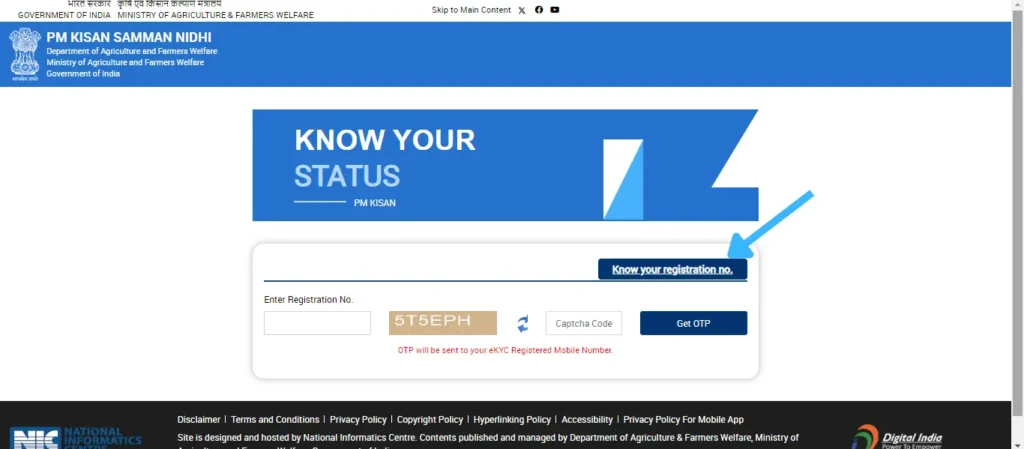
If you’ve forgotten your registration number, you can easily retrieve it using your Aadhaar number and mobile number by clicking on the ‘Know Your Registration Number’ option available on the same page.
How to View PM Kisan Yojana Beneficiary List Online
The Government of India provides an option on the PM-Kisan portal to check the list of farmers who are approved under the scheme and eligible for receiving the ₹2,000 installments. You can easily view your village-wise beneficiary list online by following these simple steps.
Visit the Official PM-Kisan Website:
Open any browser on your mobile or computer and go to:
👉 PM-Kisan Samman Nidhi
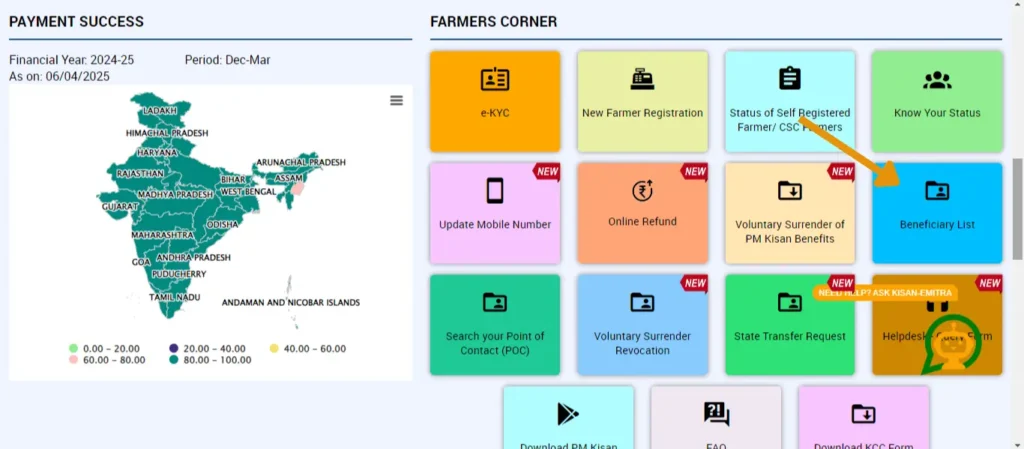
Click on ‘Beneficiary List’:
In the Farmers Corner, click on the Beneficiary List option. This will open a new page to select your area details.
Select Your Location Details:
On the Beneficiary List page, you need to select the following from the dropdown menus:
- State
- District
- Sub-District (Taluk/Block)
- Village
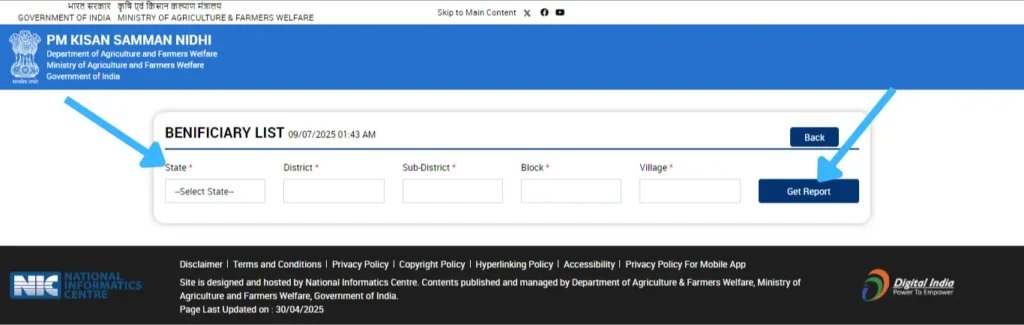
Make sure to select your correct area details to view the right list.
Click on ‘Get Report’:
After selecting your details, click on the Get Report button.
The beneficiary list for your village will appear on the screen.
View and Check Your Name:
Go through the list to find your name. It will show the farmer’s name, father’s name, and other details.
If your name appears, it means you are approved under PM-Kisan Yojana and eligible to receive the installments.
How to Update e-KYC on PM Kisan Portal
As per government rules, it’s now mandatory for every PM-Kisan beneficiary to complete e-KYC (Aadhaar verification) to continue receiving the ₹2,000 installments. If your e-KYC is pending or needs updating, you can do it easily online. Here’s how:
Visit the PM-Kisan Official Website:
Open any browser and go to the official website:
👉 PM-Kisan Official Website
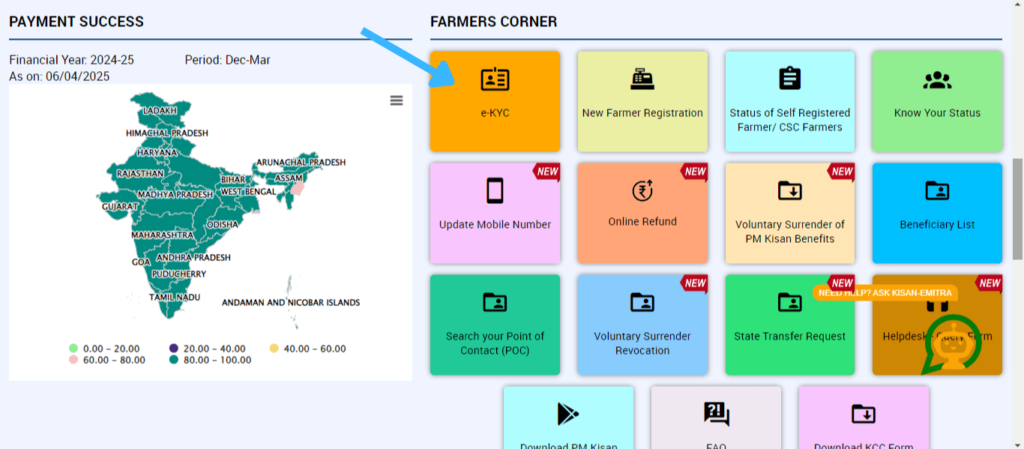
Click on ‘e-KYC’:
Under the Farmers Corner section, click on the option called ‘e-KYC’.
This will open the e-KYC update page where you can link and verify your Aadhaar number.
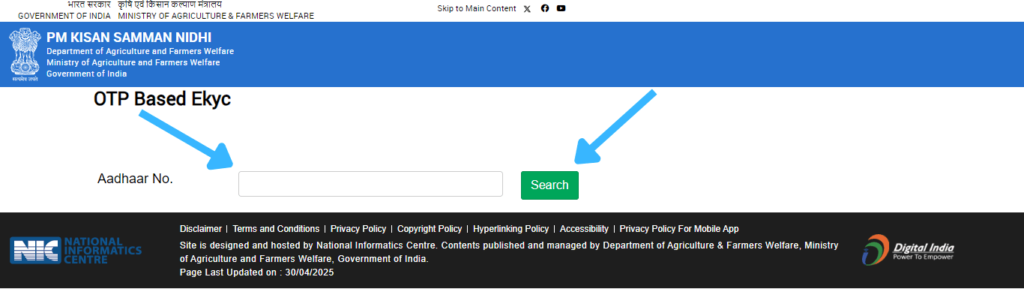
Enter Aadhaar Number:
On the e-KYC page:
- Enter your 12-digit Aadhaar Number
- Click on Search
Enter Mobile Number Linked with Aadhaar:
Now the page will ask you to enter the mobile number registered with your Aadhaar.
- Type your mobile number
- Click on Get OTP
Enter OTP and Submit:
You’ll receive a 6-digit OTP on your Aadhaar-registered mobile number.
- Enter the OTP in the given box
- Click on Submit for Authentication
e-KYC Status Message:
Once you submit the OTP:
If successful — you’ll get a message saying ‘eKYC is successfully done for this Aadhaar number’.
If failed — it will show a failure reason (like mobile not linked to Aadhaar) and you’ll have to visit your nearest CSC (Common Service Centre) to complete e-KYC through fingerprint verification.
PM Kisan 20th Installment Date 2025: Latest Update for Farmers
Farmers across the country are waiting for the 20th installment of PM-Kisan Yojana, which provides ₹2,000 directly into farmers’ bank accounts. If you’ve completed your e-KYC and your name is in the beneficiary list, here’s everything you should know about the expected date and how to check it.
When Will the 20th Installment Be Released?
As per the usual schedule, the government releases PM Kisan samman nidhi installments three times a year. Media reports suggest the 20th installment might be credited between June 20 and July 18, 2025.
Some sources claim it could be announced around July 18, 2025, but the government hasn’t officially confirmed any date yet. So, farmers are advised to keep checking the official website regularly.
Frequently Asked Questions (FAQs) — PM-Kisan Yojana
How can I register as a new farmer on the PM-Kisan portal?
Visit the official website PM-Kisan On the homepage, go to the Farmers Corner section and click on New Farmer Registration. Enter your Aadhaar number, personal details, land information, and bank details. After filling the form, submit it to complete your registration.
How do I check my new farmer registration status?
There are two ways to check your registration status.
First, use the option called Status of Self Registered Farmer / Farmer Registered Through CSC. You only need to enter your Aadhaar number to check your application status.
Second, if you have a Registration Number, select Know Your Status and enter it to get your approval or rejection status.
How can I do e-KYC for PM-Kisan Yojana?
Go to the PM-Kisan website and open the Farmers Corner section. Click on e-KYC. Enter your Aadhaar number and the OTP sent to your Aadhaar-linked mobile number. If your mobile number is not linked to Aadhaar, visit your nearest Common Service Centre (CSC) and complete biometric e-KYC.
Can I update my mobile number online on the PM Kisan portal?
You can update your mobile number online only if your application is still pending. Go to Farmers Corner and click on Updation of Self Registered Farmer Details. Enter your Aadhaar number, search your application, and update the mobile number. If your application is already approved, you will need to visit a CSC or your local agriculture office to change the mobile number.
How can I download my PM-Kisan scheme certificate online?
The official PM-Kisan website does not offer a direct scheme certificate download option. However, you can download the Beneficiary List from the portal to check your name. For an official certificate, visit your local agriculture office or Common Service Centre.
Where can I check if my name is on the PM-Kisan beneficiary list?
Go to the PM-Kisan website and open the Farmers Corner. Click on Beneficiary List. Select your state, district, sub-district, block, and village. After filling these details, click Get Report to see the list.
What documents are needed for new farmer registration?
You will need your Aadhaar card, land ownership records, bank passbook, and caste certificate if applicable.
How much benefit do farmers get under PM-Kisan Yojana?
Under this scheme, farmers receive ₹6,000 per year in three equal installments of ₹2,000. The money is transferred directly into the registered bank account.
Can I check the payment status of PM-Kisan installments online?
Yes. Visit the PM-Kisan website and open the Farmers Corner. Click on Know Your Status. Enter your Registration Number and captcha code to see the payment and approval details.
What should I do if my application is rejected?
If your application is rejected, visit your nearest CSC or local agriculture office with your Aadhaar card and land papers. They will check your details, help you correct any mistakes, and allow you to reapply or update your form.